Technical Portfolio
Selected hardware and software work in robotics, haptics, and embedded systems, with the problem, approach, and outcome behind each one.
Physical systems I've built: mechatronics, embedded control, and sensor integration.
Haptic Piano
A Hapkit-based force-feedback system that recreates the feel of pressing a piano key, inspired by the da Vinci Surgical System.
HapGait
A synchronized acquisition system linking Bertec force plates, a treadmill, and four FLIR cameras for inverse dynamics and gait analysis.
Electric Wheelchair Drive System
Dual-motor drive electronics for an accessible wheelchair, controlled wirelessly by joystick, EEG, or EMG input.
Software and systems-level work: control pipelines, simulation, and real-time integration.
ROS 2 ↔ Unreal Bridge
A middleware-agnostic communication framework streaming real-time robotics data into Unreal Engine 5.8 over ZeroMQ and JSON.
Early-stage and ongoing work.
HaptiDAR
A LiDAR-based scanner that translates spatial data into haptic vibrations for blind and low-vision users.
Coming soonVerilog Project
Hardware description language work. Details coming soon.
Coming soonHaptic Piano
A force-feedback system built on the Hapkit platform that recreates the physical sensation of pressing a piano key (initial light resistance, increasing stiffness, a firm stop, and a spring-like return) using a motor-driven haptic loop rather than a real piano mechanism.
The goal
In robotic surgery, systems like the da Vinci Surgical System let a surgeon feel resistance and pressure through a machine, even though their hands never touch tissue directly. That idea, recreating a physical sensation entirely through motor-controlled force, was the starting point for this project.
A piano key was the test case: it doesn't push back with constant force. It starts with light resistance, stiffens as it's pressed further, and hits a firm stop at the bottom. The goal wasn't to build a working piano; it was to see whether a haptic device could reproduce that specific, familiar feeling convincingly enough that someone pressing it would recognize it.
What the Hapkit provided
Rather than building a force-feedback mechanism from scratch, we built on the Hapkit, an open-source haptic device platform. It gave us three things already built in:
- Motorized force feedback through a capstan (cable-driven) transmission, so the motor could push back against the user's hand instead of just moving a handle.
- Encoder-based position sensing to track how far the handle had rotated, which we converted into a physical displacement value in software.
- A mechanical transmission system linking the motor to the handle, which gave us a stable physical interface to attach a custom key to.
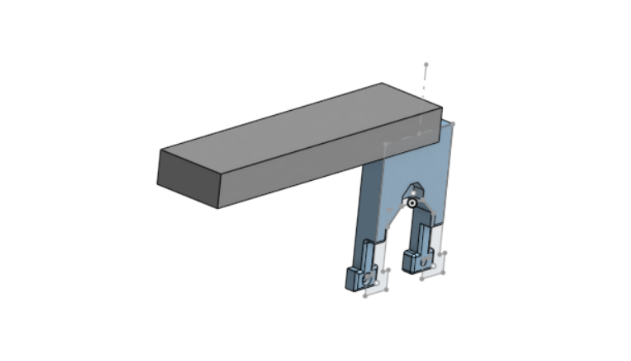
On top of that base, we designed and 3D-printed a custom piano-key attachment that mounted onto the Hapkit's handle: built as a simple rectangular block, constrained to stay light enough that it wouldn't throw off the motor's force calibration.
Approach
We modeled the key as a spring-damper system: force increases with displacement to simulate stiffness, rises sharply near the bottom of the travel to simulate a hard stop, and includes a damping term to reduce oscillation and keep the motion feeling physical rather than jittery.
The control loop supported four switchable haptic environments (Piano Key, Hard Stop + Vibrate, Push Left, and Push Right), each computing its own force response from the same position and velocity inputs.
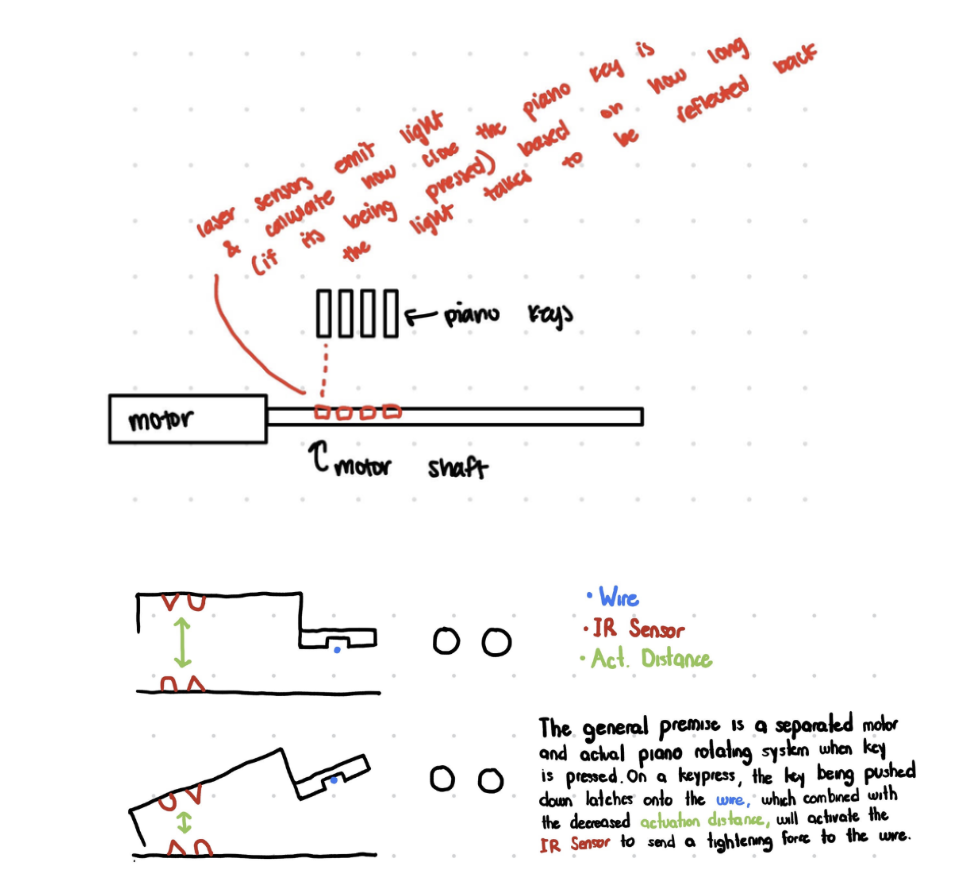
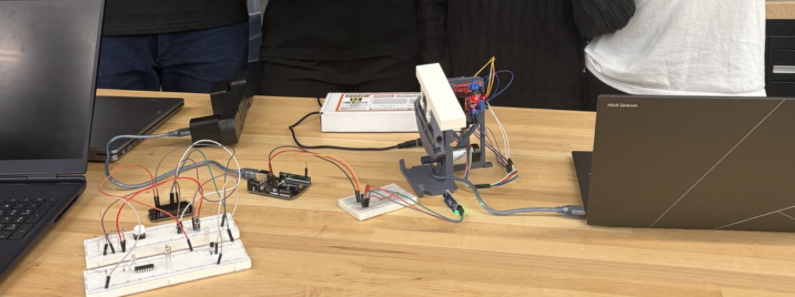
We also tried to upgrade the position sensing with IR sensors, aiming for continuous (analog) measurement instead of the encoder's discrete steps, which would have allowed finer force scaling and, eventually, sound that varied with how hard the key was pressed. We sketched out the intended sensor geometry before building it:
What we achieved
- Built a working single-key haptic interface with real-time force feedback across four switchable haptic environments.
- Successfully reproduced the core piano-key feel: light initial resistance, increasing stiffness, a firm end stop, and spring-like return.
- Diagnosed a sensor procurement issue: the IR sensors we'd sourced were digital, not analog, so they could only report on/off rather than continuous position. We validated the sensor logic on its own, then fell back to the Hapkit's encoder for the final control loop, which held up reliably.
- Presented the system at Demo Day and fielded live technical questions on sensing, actuation, and what made the feedback feel realistic.
What's next
Planned extensions include replacing the digital IR sensors with analog ones for continuous force scaling, expanding from one key to a multi-key system (and working out whether each key needs its own motor), adding sound output through a DAC and speaker tied to key displacement, and refining the force curve to recreate a real piano's "escapement" drop-off partway through the keypress.
HapGait
A synchronized acquisition system linking a Bertec instrumented treadmill, dual force plates, and a four-camera motion-capture array on a single hardware clock, built to support inverse dynamics and gait analysis.
The problem
Inverse dynamics needs one spatial and temporal frame: force, center of pressure, and reconstructed joint positions all have to line up in time and space, or the resulting joint angles and moments are wrong. That's straightforward to say and hard to build, since it means a four-camera array, a dual-belt force-sensing treadmill, and a data acquisition card all have to agree on the same clock, down to a fraction of a frame, for an entire walking trial.
HapGait is the acquisition system built to do that: a native Windows application that drives the cameras, the treadmill, and the force plates together, checks whether they actually stayed in sync, and only accepts a trial once that's verified.
Hardware synchronization
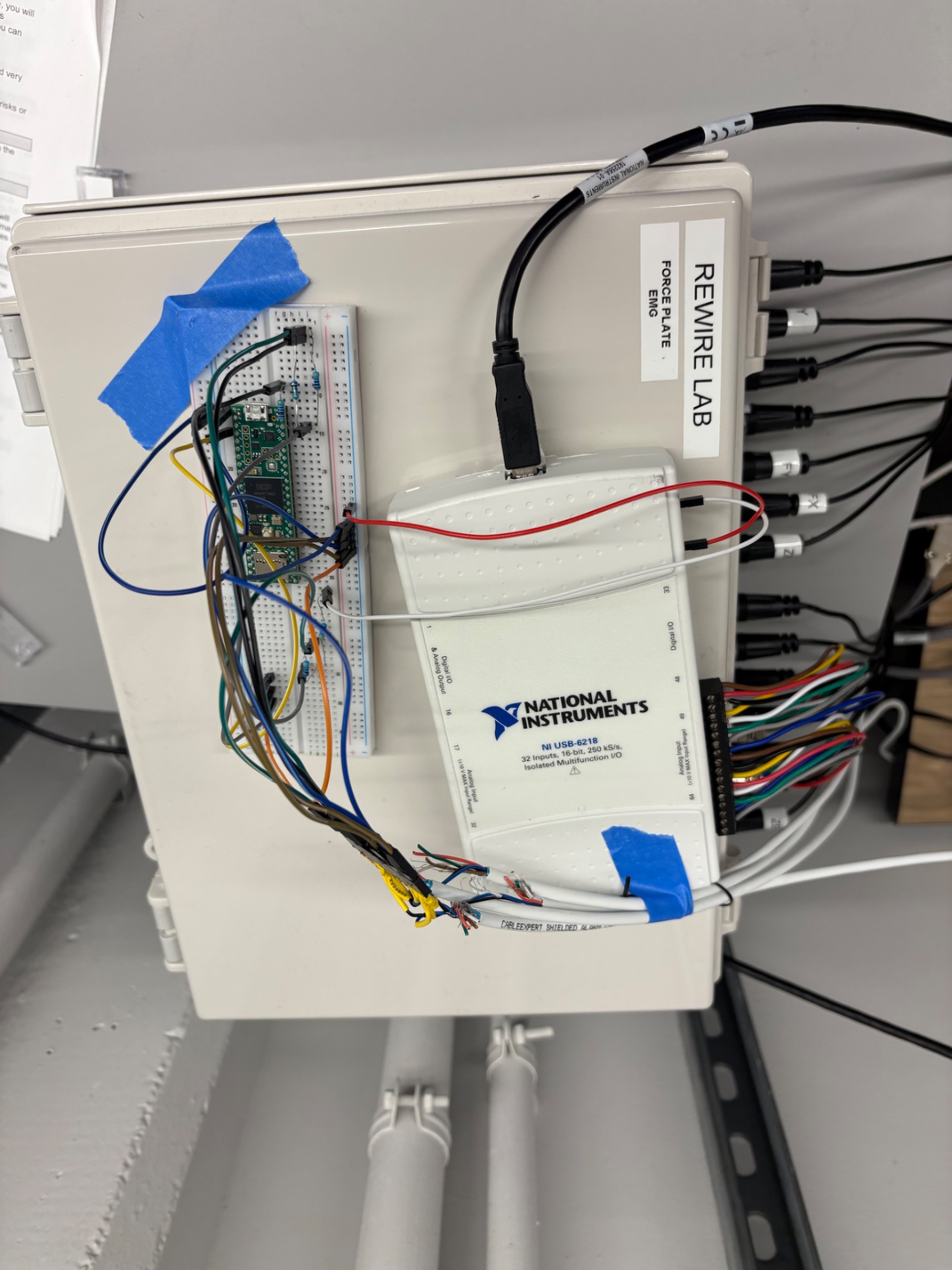
A Teensy microcontroller generates a shared hardware trigger pulse and fans it out two ways: directly into all four FLIR cameras, so every camera exposes its frame at the same instant, and into a counter input on the NI USB-6218 DAQ, so each analog force sample can be matched against the exact pulse count the cameras saw. That sidesteps needing a dedicated high-speed analog trigger channel: the DAQ just has to count edges accurately, which it does well.
The diagram below reflects the as-built wiring on the bench (force-plate and EMG inputs on the left into the DAQ, Teensy and trigger circuitry on the breadboard, USB out to the host PC).
Trigger path (cyan) shown separately from data paths (gray): one Teensy pulse keeps cameras and force samples on a common clock.
Software
HapGait itself is a native Windows desktop app written in Python with a PySide6 (Qt) interface. It's the single control surface for the whole rig: a live walking view with center-of-pressure trail and gait-symmetry/phase detection, per-device status so the operator can see at a glance whether force plates, treadmill, and cameras are each actually connected, and a guided workflow for recording and reviewing trials. Each device connects independently: a missing camera or an unplugged Teensy never blocks the others from working.
Camera calibration
The four-camera array is calibrated using a custom 3D-printed cube covered in ArUco markers. The app guides the operator to move the cube through under-covered image regions and poses, saves synchronized capture sets, then solves per-camera intrinsics and jointly refines every camera's position with a robust global bundle adjustment, validated against poses that were held out of the fit.
Current status: the calibration pipeline is implemented and running end to end, but the most recent capture session hasn't yet passed the project's accuracy gates (held-out reprojection error and known 3D distance checks). That's the active debugging focus right now, not a finished result.
Fault tolerance
Because this runs with hardware that can be physically moving, the system is built so a single failure can't take the whole trial down: optional dependencies (a missing camera SDK, a missing DAQ driver) degrade gracefully instead of crashing the app, a failing camera's own write queue is isolated so it can't block force-data recording, telemetry from the treadmill is range-checked before it's trusted rather than taken at face value, and every trial automatically gets a quality report checking frame gaps, trigger-ID matching, and clock drift, so a trial is explicitly marked passed or failed rather than silently accepted.
What's working now
- Verified end-to-end hardware trigger sync across all four cameras: a dedicated test recorded 829 complete, gap-free frames per camera, exactly matching 829 Teensy pulses at 165 FPS.
- Replaced an earlier single-channel acquisition script (reading one voltage at 100 Hz with no real force scaling) with a corrected 12-channel, hardware-clocked pipeline at 2,000 samples/second/channel, with proper force/moment scaling and corrected bilateral center-of-pressure math.
- Built the full guided camera-calibration capture flow and bundle-adjustment solver, from image collection through held-out validation.
What's next
The immediate next step is finishing camera-array calibration to the point where it reliably passes the project's validation gates (reprojection error, known 3D distance checks, and repeatability across re-calibrations). After that, the plan is to build out the inverse dynamics pipeline itself, reconstructing 3D pose from the camera array into a scaled musculoskeletal model and combining it with the synchronized force data to compute joint angles and moments, and to integrate IMUs as an additional motion-tracking input alongside the camera array.
Electric Wheelchair Drive System
An electric wheelchair built to give people with limited mobility, including those with paralysis, accessible movement through joystick, EEG, or EMG control, developed across Longhorn Neurotech's electronics, design, and hardware-software integration teams.
This project belongs to Longhorn Neurotech, a UT Austin student organization, and was built across multiple teams. What's shown here is limited to the drive electronics work, kept at a high level out of respect for the organization's ownership of the full system.
The goal
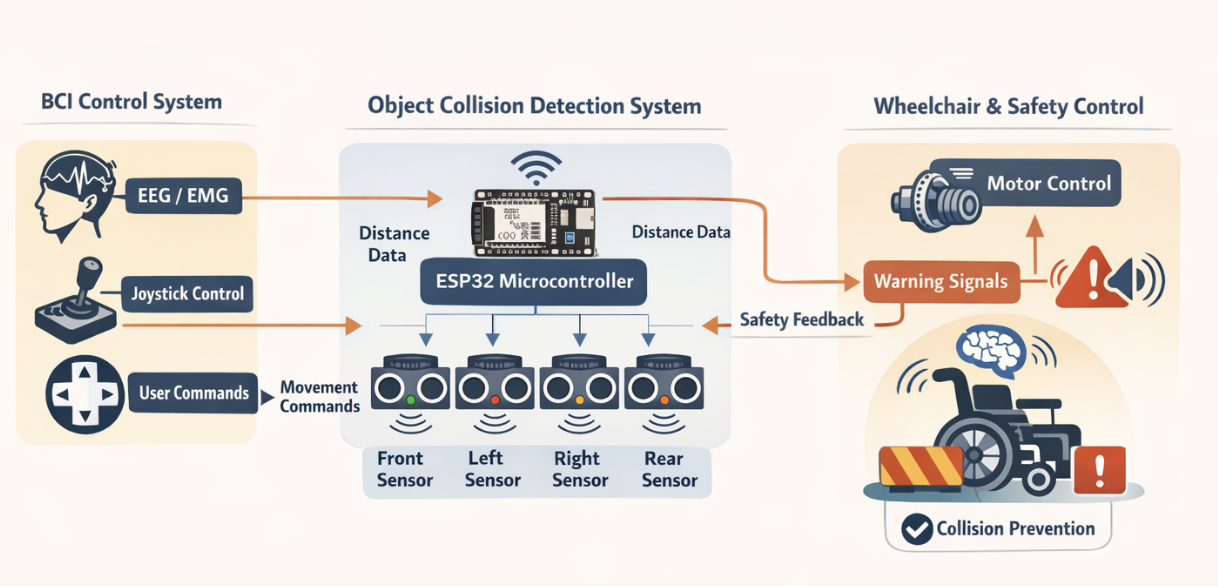
Provide accessible motion to people with limited mobility, such as those with paralysis, through a wheelchair that can be driven by whichever input works for the user: a joystick, EEG signals, or EMG signals, all communicating wirelessly into one control system. The chair supports five motion states: stopped, moving forward, moving backward, turning left, and turning right.
Drive electronics
My contribution was on the drive system: wiring and tuning the dual-motor electronics that actually move the chair. The system uses two 24V batteries and two IBT-2 motor driver boards, each driving one of the chair's brushed DC motors, with an Arduino Nano reading the incoming control signal and generating the motor commands. Fuses and a kill switch sit inline on the power side for safety.
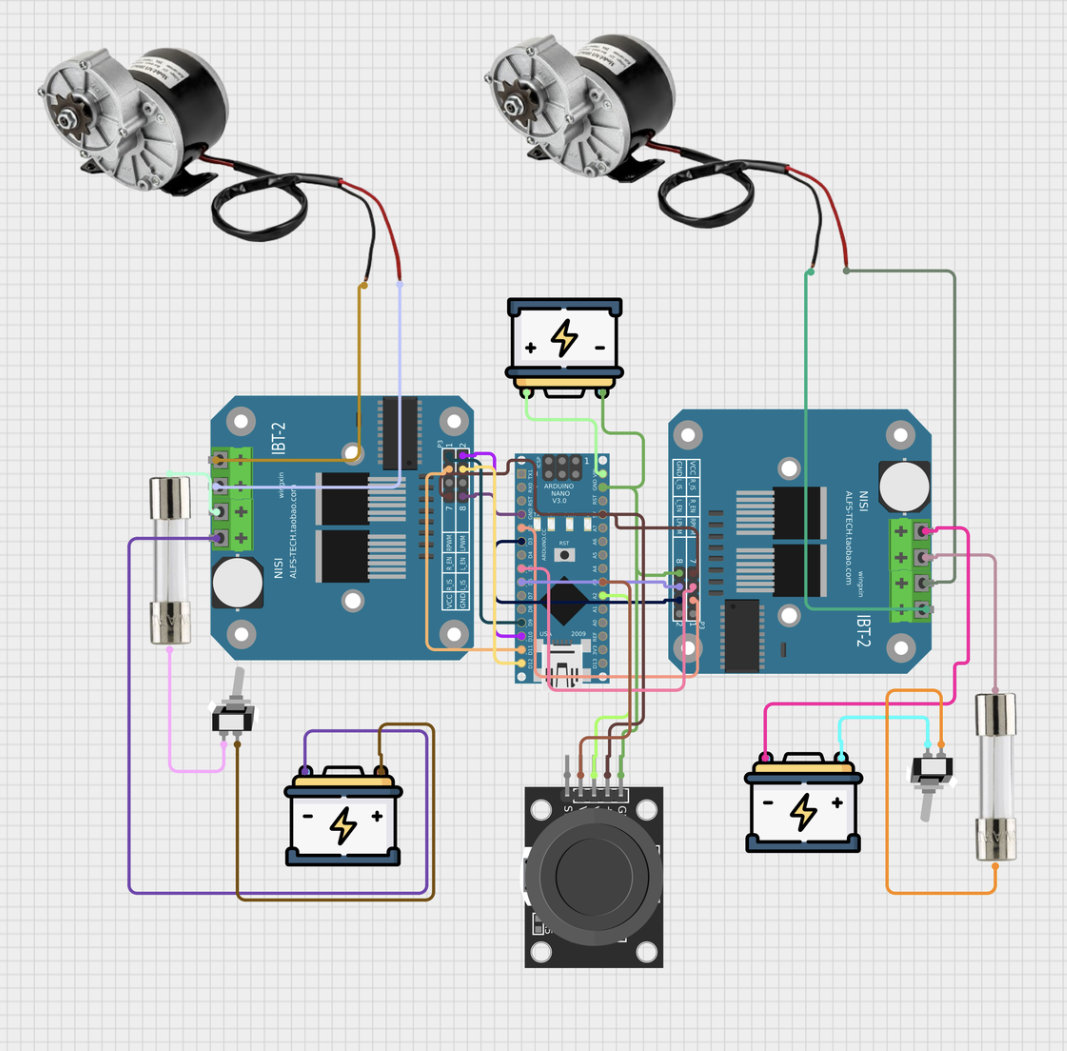
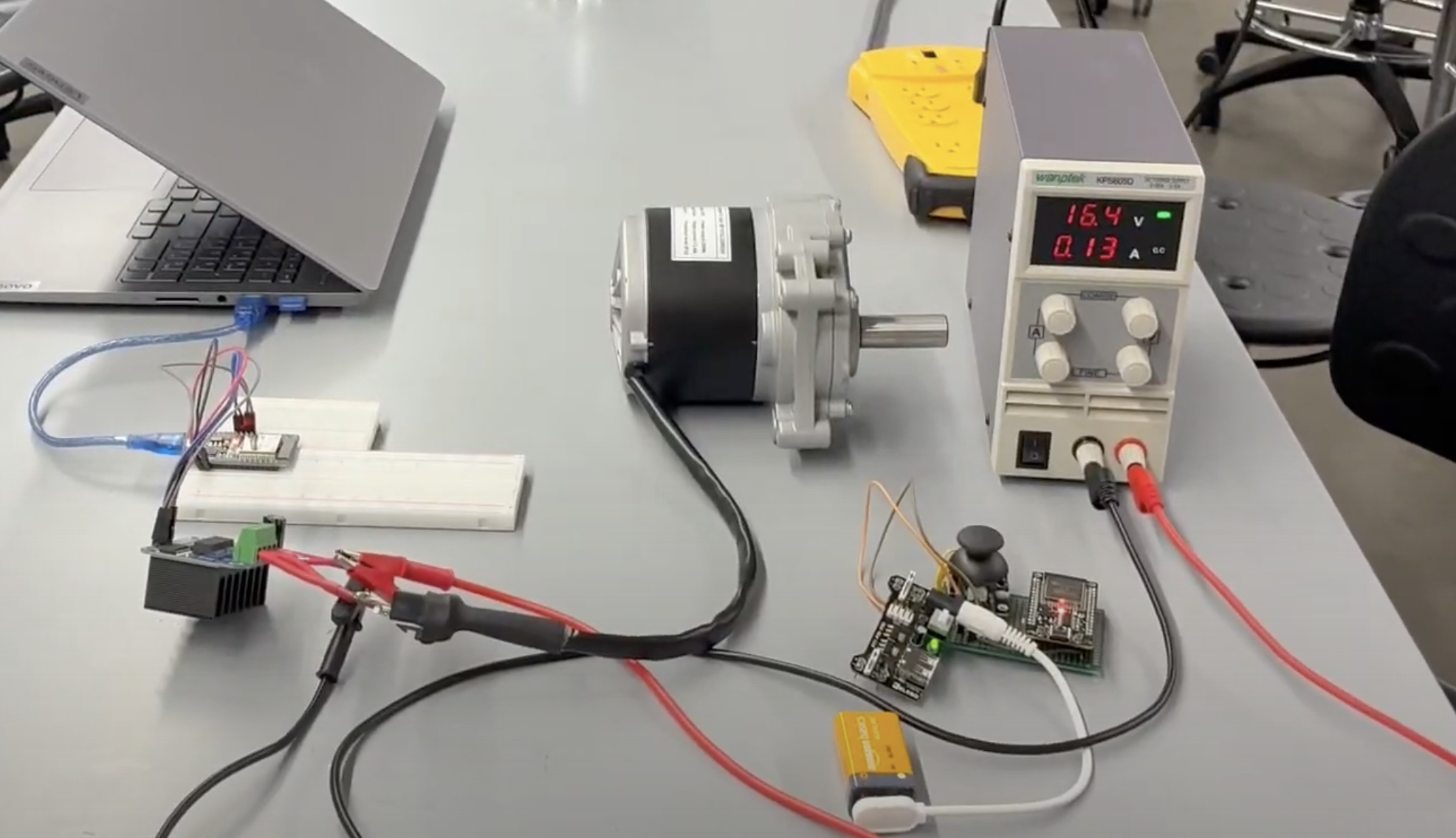
Signal pipeline
Where this fits
The drive electronics are one piece of a larger safety and control architecture built across the project's teams: EEG, EMG, and joystick inputs all feed into a shared control system, an ESP32-based collision detection layer reads four ultrasonic sensors around the chair to catch obstacles, and that safety layer sits between the user's input and the motor control this project's drive system handles.
ROS 2 ↔ Unreal Bridge
A modular communication framework for streaming structured, real-time data into Unreal Engine 5.8, built to bridge robotics software and a game engine without locking either side to a specific middleware.
The goal
Get real-time robotics data into Unreal Engine 5.8 for live visualization, without hard-coupling that visualization to one specific robotics middleware. The requirement wasn't just "make it work with ROS 2 right now," it was "make the Unreal side never have to know or care what's producing the data."
Approach
The bridge communicates over ZeroMQ, with messages structured as JSON. That combination was chosen specifically because it's middleware-agnostic: ZeroMQ doesn't care what's on either end of the socket, and JSON is just structured text, so neither side has to link against ROS 2 at all. The current implementation uses a Python publisher to validate the full pipeline end to end. The architecture is built so that publisher can be swapped for a native ROS 2 Jazzy node later without changing anything on the Unreal side: as far as Unreal is concerned, it's still just JSON arriving over a socket.
What I learned
- Designing an interface around a transport and data format instead of a specific framework, so the producer and consumer stay decoupled and either side can change independently.
- Validating a system incrementally: proving the communication pipeline with a simple Python publisher first, instead of committing to the full ROS 2 integration before knowing the pipeline worked at all.
- Structuring a real-time system as focused, single-responsibility packages rather than one monolith, which made it possible to swap, test, or hand off individual pieces (a driver, a controller, an interface definition) without the rest of the system changing.
- Getting external, real-time data into a live Unreal Engine scene, which sits outside the usual ROS 2 toolchain and needed its own learning curve on the Unreal side.
Where this fits
This bridge is one package inside a larger ROS 2 workspace I built for the HeRo Lab's treadmill and motion-capture system, the same system behind the HapGait project:
What's next
Completing the transition from the Python validation publisher to a native ROS 2 Jazzy node, with no changes required on the Unreal-side communication layer.